





























































Move Your AI Chats to RolePlaya: Import From Character.AI, Janitor AI, SillyTavern, Chub and More
Leaving Character.AI, Janitor AI, PolyBuzz or SpicyChat? Export your chats and import them into RolePlaya, the alternative that keeps your story going. Free, 18+, step by step for every site.
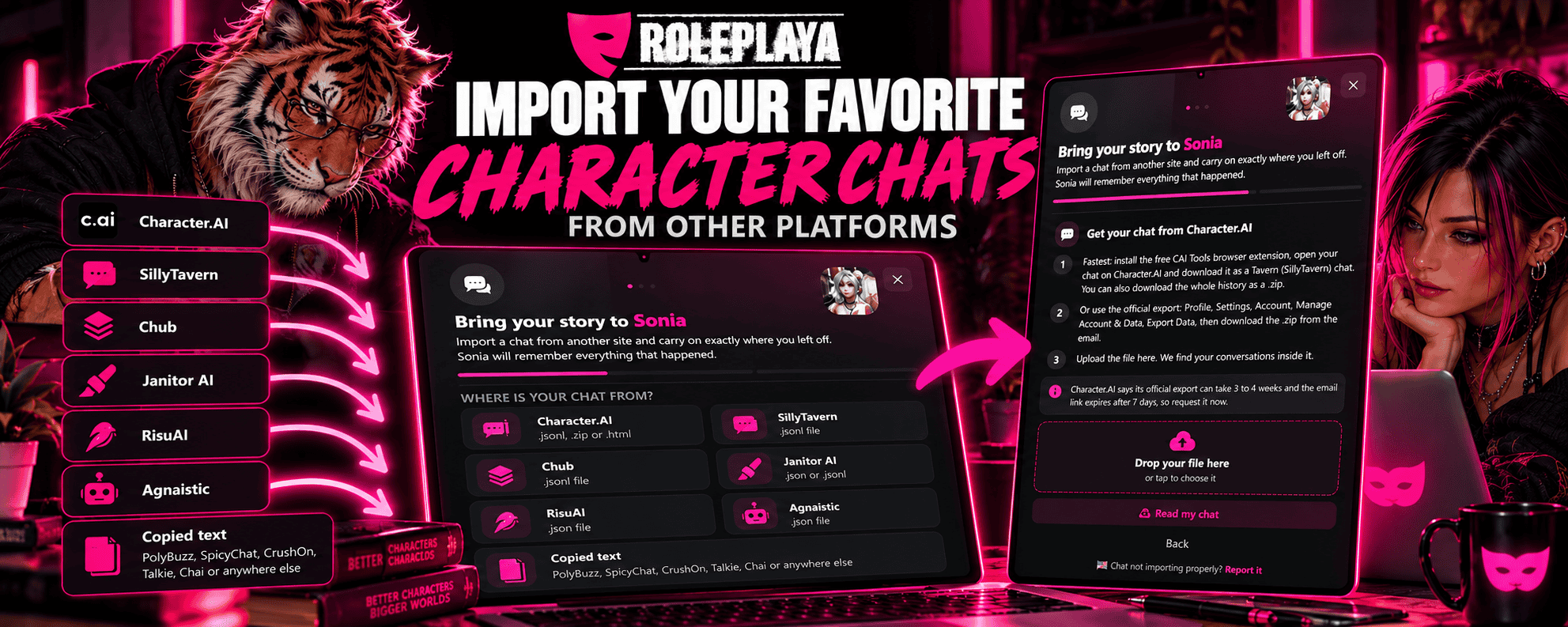
The worst part of leaving an AI chat site is not the characters. You can rebuild those. It is the story. Months of scenes, in-jokes and slow burn, and the thought of starting again from a greeting. So now you do not have to. RolePlaya imports chats from Character.AI, SillyTavern, Chub, Janitor AI, RisuAI and Agnaistic, and pasted text from anywhere else. The character picks up exactly where you left off and remembers what happened. It is free on every plan, for members and characters aged 18 and over.
Why this matters right now
Character.AI filed for bankruptcy on 12 October 2026 and is being sold. Nobody yet knows who ends up with the platform, or with the conversations people typed into it, which is why 40 attorneys general have asked the court to limit who can buy them. A lot of people are downloading their chats as a precaution. Until now, that download just sat in a folder. Now it can turn back into a living story.
It is not only Character.AI. Sites change their rules, raise their prices, add filters or shut down. Your stories should not be stuck wherever you happened to start them.
Which sites you can import from
| Site | How you get the chat out | File |
|---|---|---|
| Character.AI | CAI Tools browser extension (fastest), or Character.AI's own data export | .jsonl, .zip or .html |
| SillyTavern | Manage chat files, export as .jsonl | .jsonl |
| Chub | Export or download the chat from the chat menu | .jsonl |
| Janitor AI | A free Janitor chat exporter extension | .json or .jsonl |
| RisuAI | Export from the chat list, one chat or all of them | .json |
| Agnaistic | Export chat from the chat menu | .json |
| PolyBuzz, SpicyChat, CrushOn, Talkie, Chai and others | Copy the conversation from the page and paste it in | Pasted text |
How to import a chat, step by step
- Open a chat with the character you want to continue with. If they are not on RolePlaya yet, create them first, or find a public character close enough.
- Open the menu and tap Import Chat. On PC there is also an Import button on the character image in the sidebar, and an Import tile on the character's profile page.
- Pick the site your chat came from. Each one shows you exactly how to export from it.
- Upload the file, or paste the text. If the file holds several conversations, choose the one you want.
- If it is not clear which speaker is you, tap your name.
- You will see how the story began and where you left off. Tap Continue and the chat opens, ready for your next message.
How to export your Character.AI chats and move them
The quickest route is the free CAI Tools browser extension. Open your chat on Character.AI and download it as a Tavern (SillyTavern) chat, or download the whole history as a .zip. It takes seconds, and RolePlaya reads both.
Character.AI also has an official export: Profile, Settings, Account, Manage Account & Data, Export Data. The catch is time. Character.AI says it can take three to four weeks, and the email link expires after about seven days. If you want a full backup before the sale, request it today, then upload the .zip when it arrives. We find your conversations inside it.
How to move your Janitor AI chats to another site
Janitor AI has no export button of its own, so use a free Janitor chat exporter extension that saves the chat as .json or as a SillyTavern .jsonl file. Open your chat on Janitor, export it, then choose Janitor AI in Import Chat on RolePlaya and upload the file. No extension? Copy the chat from the page and use Copied text instead.
How to move SillyTavern chats to another site
In SillyTavern, open the chat, go to Manage chat files and export it as .jsonl. Choose SillyTavern in Import Chat and upload it. Swipes are handled for you: the version you picked is the one that comes across.
Moving from Chub, RisuAI or Agnaistic
Chub: export or download the chat from the chat menu as .jsonl. RisuAI: use the export button in the chat list, for one chat or all of them, and we find each conversation inside. Agnaistic: open the chat menu and choose Export chat. If you went down a branch, only the branch you were on comes across.
Moving from PolyBuzz, SpicyChat, CrushOn, Talkie or Chai
These sites do not let you download your chats, but you can still bring them. Select the conversation on the page, copy it, choose Copied text and paste it in. Each message should start with the speaker's name and a colon, like Amber: Hello there. Most sites copy that way already. You pick which name is yours on the next step.
What comes across
- Your most recent 3,000 messages, in full, in order.
- Everything before that is remembered as the story so far, so the character still knows how you got here.
- Your original dates where the file has them.
- A fresh thread in History, so it never mixes with a chat you already have with that character.
Imported messages never use up your daily messages, so even a free account can bring over a long story and keep going.
18+ only
RolePlaya is for adults. You must be 18 or over to use it, and every character in a chat you import must be 18 or over too. A chat involving anyone under 18 is refused and nothing from it comes across.
If a chat will not import
Export formats change, and some files are odd. If yours will not come across, or comes across wrong, tap Report it at the bottom of the import window and include your file if you can. I fix it as soon as possible and you get a notification on RolePlaya when it is ready to try again.
Why carry on here
RolePlaya is built for long stories. Characters keep long-term memories of what happened between you, can speak in their own voice, and you can drop a snapshot of the moment into the chat. There are thousands of public characters, worlds that link them together, and a free tier with no adverts.
Create a character to import into or see how RolePlaya compares.
Frequently asked questions
Can I import my Character.AI chats?
Yes. Download the chat with the free CAI Tools extension, or use Character.AI's own data export, then open Import Chat on RolePlaya, pick Character.AI and upload the file. It is free on every plan.
Is there a Character.AI alternative that keeps my chat history?
Yes. RolePlaya imports your Character.AI chats, so you can move to it without losing your stories. The character picks up where you left off and remembers what happened.
Can I transfer my Janitor AI chats to another site?
Yes. Save the chat with a Janitor chat exporter extension, or copy it from the page, then import it on RolePlaya and carry on.
How do I move my PolyBuzz or SpicyChat chats?
Neither site has an export, so copy the conversation from the page and paste it into Import Chat on RolePlaya using Copied text.
Which sites can I import chats from?
Character.AI, SillyTavern, Chub, Janitor AI, RisuAI and Agnaistic by file. PolyBuzz, SpicyChat, CrushOn, Talkie, Chai and any other site by copying and pasting the conversation.
Does the character remember what happened before?
Yes. Your most recent 3,000 messages come across in full, and anything earlier is remembered as the story so far, so the character carries on from where you left off.
Does importing cost anything or use my daily messages?
No. Importing is free on every plan and imported messages do not count towards the daily message limit.
Can I import any chat?
Only chats where every character is 18 or over. RolePlaya is for adults only, and a chat involving anyone under 18 is refused.
What if my chat file will not import?
Tap Report it in the import window and include the file. The problem gets fixed as soon as possible and you get a notification when it is ready to try again.
Character.AI, c.ai, SillyTavern, Chub, Janitor AI, RisuAI, Agnaistic, PolyBuzz, SpicyChat, CrushOn, Talkie, Chai and CAI Tools are trademarks or names of their respective owners. RolePlaya is not affiliated with, endorsed by, sponsored by or connected to any of them. Export steps reflect each site as of 17 October 2026 and can change.